
Premium all-in-one fight stick or cheap DIY arcade kit: which wins?
These two products solve very different problems, even though both are aimed at arcade-style gaming. The MAYFLASH F300 is a ready-to-play universal fight stick for modern consoles and PC, while the EG STARTS kit is a budget DIY encoder bundle for building a custom arcade panel. If you want the best out-of-the-box experience, the choice is straightforward; if you want to build your own cabinet or 2-player panel, the other option becomes more interesting. The right pick depends less on raw price and more on how much work you want to do and what platforms you need to support.
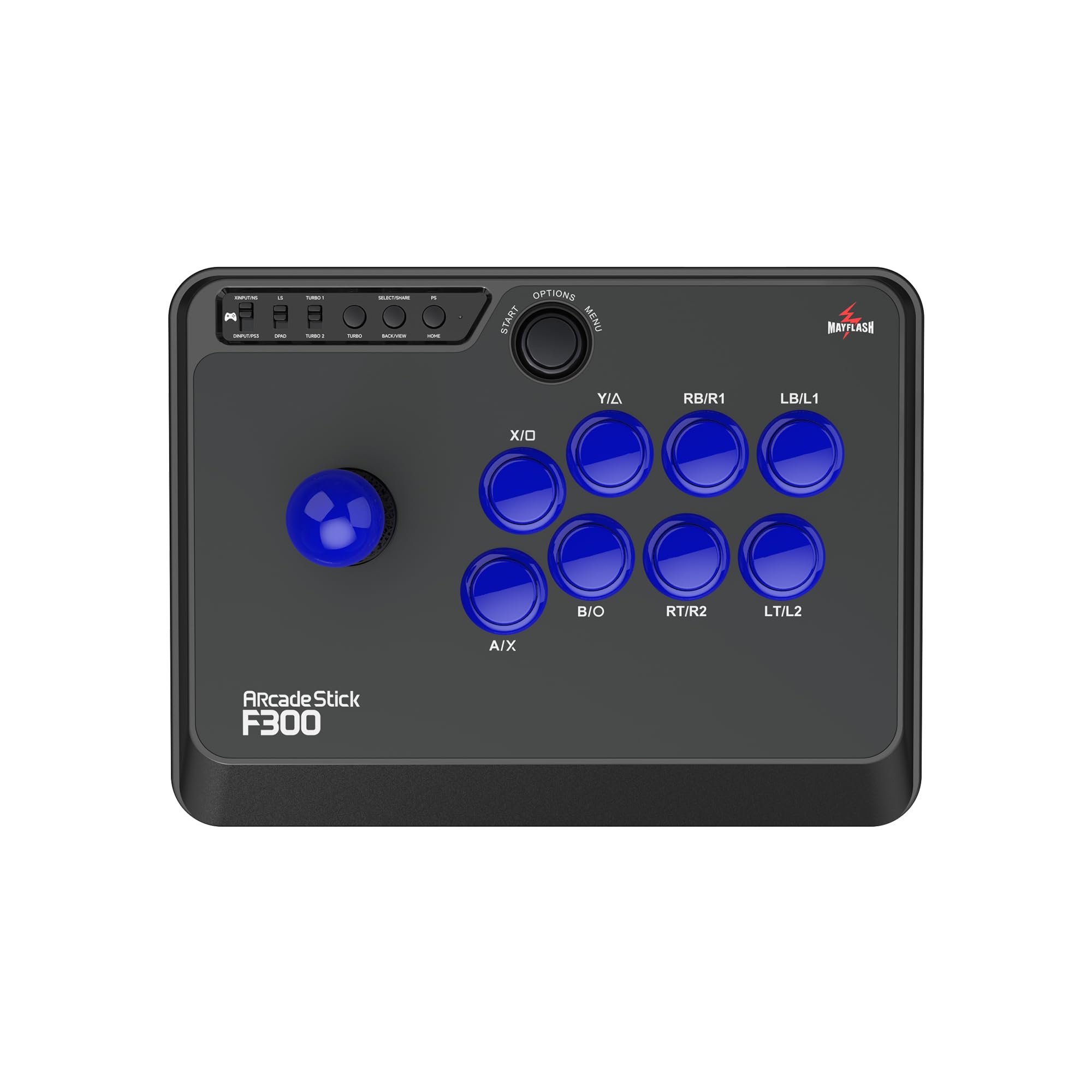
MAYFLASH F300 Arcade Fight Stick Joystick for Switch/Switch 2, PS4, PS3, Xbox Series S/X, Xbox One, Xbox 360, macOS, Windows, Steam Deck and more

2 Player Arcade Contest DIY Kits USB Encoder To PC Joystick + 8 Ways Sticker + Chrome LED Illuminated Push Button 1 & 2 Player Coin Buttons For Arcade Mame Raspberry Pi 2 3 3B Games
Our Recommendation
Buy the MAYFLASH F300 unless you specifically want to build a custom arcade panel. It is a finished controller with far broader platform support, a much stronger review base, and a proven plug-and-play experience. The EG STARTS kit is cheaper, but it requires more work and only makes sense for DIY cabinet projects. For most shoppers, the F300 is the safer, better-value purchase.
Detailed Comparison
Display
This category is not really applicable in the traditional sense, because neither product includes a screen. If we interpret display as the user-facing control layout and visual presentation, the MAYFLASH F300 wins. Its finished arcade-stick design is clean, recognizable, and immediately understandable, while the EG STARTS kit is just components that only become visually coherent after you supply a panel, artwork, and assembly. The F300 is the better choice if you want something that looks finished on day one.
Performance
The MAYFLASH F300 wins decisively for performance in real-world use. It is a complete, tested controller designed for plug-and-play play on Switch, Switch 2, PS4, PS3, Xbox Series S/X, Xbox One, Xbox 360, macOS, Windows, and Steam Deck, which means fewer compatibility surprises and less setup time. The EG STARTS kit can perform well in a custom build, but performance depends heavily on your own wiring, buttons, panel, and the quality of the final assembly. For most buyers, the F300 delivers more reliable and predictable input performance with far less effort.
Build quality and design
The MAYFLASH F300 wins again. At £59.99 and backed by 6,673 reviews with a 4.5/5 rating, it has a strong track record and a mature product design. It is a purpose-built stick with a single-player layout that is ready to use immediately, which is a major advantage for anyone who values convenience and consistency. The EG STARTS package is more of a parts bundle: USB encoder, sticker, chrome LED buttons, and coin buttons. That can be great for a DIY enthusiast, but it is not a finished product, and the end result depends on your craftsmanship. If you want dependable build quality out of the box, the F300 is the safer and better-made choice.
Battery life
Neither product is battery-powered, so battery life is not a meaningful differentiator. The MAYFLASH F300 is the only one that behaves like a finished consumer controller, while the EG STARTS kit is a wired DIY solution that relies on your build. In practical terms, this means the F300 wins on convenience because you do not have to think about power management, charging, or custom electrical setup. The EG STARTS kit has no battery advantage and no battery-related feature to offset its extra complexity.
Price and value for money
This is the one area where the EG STARTS kit has a clear advantage on sticker price, coming in at £42.88 versus £59.99 for the MAYFLASH F300, a difference of £17.11. However, the cheaper price only matters if you already have the rest of the parts and the skills to complete the build. If you need a fully functional controller right away, the F300 is better value because it includes the complete stick, higher user confidence, and much broader platform support. The EG STARTS bundle is value-packed only for users who specifically want a DIY project and already have a cabinet or panel to install it into.
Game library/features
The MAYFLASH F300 wins on features by a wide margin. Its compatibility list is enormous: Switch/Switch 2, PS4, PS3, Xbox Series S/X, Xbox One, Xbox 360, macOS, Windows, and Steam Deck, making it one of the more flexible fight sticks in this price range. That broad support matters because it lets one purchase cover multiple systems and future-proof your setup. The EG STARTS kit is much narrower, aimed at PC joystick use, MAME, and Raspberry Pi 2/3/3B-style arcade projects. It can be ideal for emulation cabinets, but it is not nearly as versatile for modern console gaming. For feature breadth, the F300 is the clear winner.
Overall user experience
The MAYFLASH F300 delivers the better user experience by a large margin. You buy it, plug it in, and play across a huge range of devices with minimal friction. Its 4.5/5 rating from 6,673 reviews suggests that most buyers are satisfied with the product’s consistency and ease of use. The EG STARTS kit is only the better experience if your idea of fun includes wiring buttons, mounting hardware, and building a custom panel from scratch. For everyone else, the extra setup time and uncertainty make it less approachable and less satisfying as a first purchase.
Overall summary: the MAYFLASH F300 is the better buy for almost everyone because it is a complete, highly compatible, well-reviewed controller with strong value despite the higher price. The EG STARTS kit is cheaper and potentially useful for DIY arcade cabinet builders, but it is not a direct substitute for a finished fight stick. If you want the best all-around product, choose the F300. If you want a project and already have a build in mind, the EG STARTS kit can make sense.
Buy the MAYFLASH F300 Arcade if...
Buy Product A if you want a ready-to-use fight stick for consoles, PC, or Steam Deck without any assembly. It is also the better choice if you care about broad compatibility across Switch, PlayStation, Xbox, macOS, and Windows. Choose it if you value reliability, convenience, and a product with thousands of positive reviews.
Buy the 2 Player Arcade if...
Buy Product B if you are building a custom arcade cabinet or 2-player MAME/Raspberry Pi setup and need the encoder/buttons rather than a finished stick. It makes sense if you already have the enclosure, tools, and wiring knowledge to complete the project. Choose it only if DIY customization is the goal and lower upfront cost matters more than convenience.
Curated by Light Gun Gamer on All The Top Picks
As an Amazon Associate we earn from qualifying purchases.